> ## Documentation Index
> Fetch the complete documentation index at: https://stedi.com/docs/llms.txt
> Use this file to discover all available pages before exploring further.
# Events types and structure
Stedi emits events as it processes and generates EDI files. You can use these events to trigger [webhooks](/edi-platform/configure/webhooks/index), trigger alerts in systems like Slack or PagerDuty, and implement more advanced functionality.
## Event types
Stedi emits the following types of events.
### Transaction processed
The `transaction.processed.v2` event is the primary integration point for transactions you receive from your trading partner. Stedi emits one `transaction.processed.v2` event for every transaction successfully processed.
Since an EDI file can contain multiple transactions, a single EDI file can result in multiple `transaction.processed.v2` events.
```json webhook
{
"event": {
"version": "0",
"id": "65409ec4-6d2d-dc87-43e2-3b31ff49d2da",
"detail-type": "transaction.processed.v2",
"source": "stedi.core",
"account": "",
"time": "2025-05-06T19:35:08Z",
"region": "us-east-1",
"resources": [],
"detail": {
"transactionId": "d303ce95-7533-4f18-916d-51b7e446c364",
"direction": "INBOUND",
"mode": "test",
"fileExecutionId": "e181c2ab-f85c-42bd-9cda-a7bd1e32b4c9",
"processedAt": "2025-05-05T20:14:55.809Z",
"fragments": null,
"artifacts": [
{
"artifactType": "application/edi-x12",
"usage": "input",
"url": "https://core.us.stedi.com/2023-08-01/transactions/d303ce95-7533-4f18-916d-51b7e446c364/input",
"sizeBytes": 1077,
"model": "transaction"
},
{
"artifactType": "application/json",
"usage": "output",
"url": "https://core.us.stedi.com/2023-08-01/transactions/d303ce95-7533-4f18-916d-51b7e446c364/output",
"sizeBytes": 5118,
"model": "transaction"
}
],
"partnership": {
"partnershipId": "local-clearinghouse-test",
"partnershipType": "x12",
"sender": {
"profileId": "clearinghouse-test"
},
"receiver": {
"profileId": "local"
}
},
"x12": {
"transactionSetting": {
"guideId": "01JJ49X7R37FQ7WP29WWMQ0N6A",
"transactionSettingId": "01JA95YJZ68VGHAZV2ET0AZW44"
},
"metadata": {
"interchange": {
"acknowledgmentRequestedCode": "0",
"controlNumber": 194
},
"functionalGroup": {
"controlNumber": 194,
"release": "005010X214",
"date": "2025-05-05",
"time": "20:14:19",
"functionalIdentifierCode": "HN"
},
"transaction": {
"controlNumber": "1001",
"transactionSetIdentifier": "277"
},
"receiver": {
"applicationCode": "524147114425",
"isa": {
"qualifier": "ZZ",
"id": "524147114425"
}
},
"sender": {
"applicationCode": "STEDITEST",
"isa": {
"qualifier": "ZZ",
"id": "STEDITEST"
}
}
}
},
"connectionId": "01JA95YP8E885W00E6SAJDWGHS"
}
}
}
```
When [fragments](/edi-platform/fragments) are enabled on the transaction, Stedi emits one `transaction.processed.v2` event and one `fragment.processed.v2` event for each fragment.
#### Retrieve transaction data
You can use the `documentDownloadUrl` URLs in the `event.detail.artifacts` objects to fetch transaction data from Stedi.
* Use the URL in the artifact with `"usage": "input"` to fetch the input for the transaction. For inbound transactions, this is the EDI you received from your trading partner.
* Use the URL in the artifact with `"usage": "output"` to fetch the output for the transaction. For inbound transactions, this is processed transaction data in [Guide JSON](/edi-platform/operate/transform-json/guide-json) format.
To retrieve transaction data, make a request with the URL and your Stedi API key for authorization.
If your HTTP library automatically follows redirects, you will receive the transaction data in the response body. If it does not follow redirects, the response includes a `documentDownloadUrl` that you can use to retrieve the transaction data.
The following example shows a cURL request to retrieve transaction data. This example uses the `-L` option for following redirects.
```curl
curl -L -H "Authorization: ${STEDI_API_KEY}" \
https://core.us.stedi.com/2023-08-01/transactions/$TRANSACTION_ID/output
```
### Fragment processed
This functionality is available in a Stedi module. [Contact us](https://www.stedi.com/contact) for details.
You can use [fragments](/edi-platform/fragments) to split transaction payloads into smaller chunks for easier downstream processing. By default, a single fragment will include a maximum of 800 repeated segments. You can customize the batch size when creating the [transaction setting](/edi-platform/configure/trading-partners/transaction-settings#create-transaction-settings).
Stedi emits one `fragment.processed.v2` event for each fragment within a processed transaction. The payload contains details about the original transaction, including the `ISA` and `GS` headers. These details about the original transaction are included in every fragment event.
```json Fragment with data
{
"event": {
"version": "0",
"id": "1c0872a3-dfcc-4b63-9ce7-08ce9ebd9170",
"detail-type": "fragment.processed.v2",
"source": "stedi.core",
"account": "",
"time": "2023-11-13T15:47:09Z",
"region": "us-east-1",
"resources": [
"https://core.us.stedi.com/2023-08-01/transactions/1b1d2424-72ba-4157-bcfa-3e1620430a3f"
],
"detail": {
"fileExecutionId": "bb141a6f-79f8-9c88-9b91-37609ddd90f9",
"transactionId": "1b1d2424-72ba-4157-bcfa-3e1620430a3f",
"direction": "INBOUND",
"mode": "production",
"processedAt": "2023-11-13T15:47:09.231Z",
"fragments": {
"batchSize": 800,
"fragmentCount": 1,
"keyName": "item_identification_LIN_loop"
},
"fragmentIndex": 0,
"artifacts": [
{
"artifactType": "application/json",
"usage": "output",
"url": "https://core.us.stedi.com/2023-08-01/transactions/1b1d2424-72ba-4157-bcfa-3e1620430a3f/fragments/0/output",
"model": "fragment",
"sizeBytes": 4802
}
],
"partnership": {
"partnershipId": "wormpotato_amazonds",
"partnershipType": "x12",
"sender": { "profileId": "amazonds" },
"receiver": { "profileId": "wormpotato" }
},
"x12": {
"transactionSetting": {
"guideId": "01H9JMMG4839VQG9QQVSZ6X29G",
"transactionSettingId": "01HF4N77F5YWA2RXEDMMF5FF6J"
},
"metadata": {
"interchange": {
"acknowledgmentRequestedCode": "0",
"controlNumber": 76
},
"functionalGroup": {
"controlNumber": 76,
"release": "004010",
"date": "2022-09-24",
"time": "20:01",
"functionalIdentifierCode": "IB"
},
"transaction": {
"controlNumber": "319101",
"transactionSetIdentifier": "846"
},
"receiver": {
"applicationCode": "ACME",
"isa": { "qualifier": "ZZ", "id": "WORMPOTATO" }
},
"sender": {
"applicationCode": "SENDERID",
"isa": { "qualifier": "ZZ", "id": "AMAZONDS" }
}
}
}
}
}
}
```
#### Retrieve transaction data
The following example shows a cURL request to retrieve details about the fragment associated with a transaction. This example uses the `-L` option for following redirects.
```
curl -L -H "Authorization: ${STEDI_API_KEY}" \
'https://core.us.stedi.com/2023-08-01/transactions/$TRANSACTION_ID/edi-platform/fragments/$FRAGMENT_INDEX/output'
```
### File processed
You may want to consume `file.processed.v2` events when you want to route non-EDI files that arrive on Stedi for additional processing.
Stedi emits a `file.processed.v2` event for all successful file executions. You can view details on the [Files](https://portal.stedi.com/app/core/file-executions) page.
For files with the following extensions, Stedi emits a `file.processed.v2` event but does not attempt to parse them as EDI: `.json`, `.csv`, `.xml`, `.xls`, `.xlsx` or `.pdf`.
```json file.processed.v2 event
{
"event": {
"version": "0",
"id": "84923a9b-5881-bd5b-5b7b-9f0461d0802f",
"detail-type": "file.processed.v2",
"source": "stedi.core",
"account": "",
"time": "2025-05-06T19:35:22Z",
"region": "us-east-1",
"resources": [],
"detail": {
"fileExecutionId": "e181c2ab-f85c-42bd-9cda-a7bd1e32b4c9",
"processedAt": "2025-05-05T20:14:56.038Z",
"partnershipId": "local-clearinghouse-test",
"connectionId": "01JA95YP8E885W00E6SAJDWGHS",
"source": {
"dirname": "clearinghouse/incoming",
"name": "9d7c38f4-410b-4032-aad4-016d8140b265.x12"
},
"artifacts": [
{
"artifactType": "application/edi-x12",
"usage": "input",
"sizeBytes": 1270,
"url": "https://core.us.stedi.com/2023-08-01/executions/e181c2ab-f85c-42bd-9cda-a7bd1e32b4c9/input",
"model": "execution"
},
{
"artifactType": "application/json",
"usage": "metadata",
"url": "https://core.us.stedi.com/2023-08-01/executions/e181c2ab-f85c-42bd-9cda-a7bd1e32b4c9/metadata",
"model": "execution",
"sizeBytes": 2532
}
]
}
}
}
```
### File delivered
Stedi emits the `file.delivered.v2` event every time a file is successfully delivered to a [connection](/edi-platform/configure/trading-partners/connections) for an outbound transaction set. This event is only emitted for generated EDI (outbound) files and is not emitted for inbound files.
```json file.delivered.v2 event
{
"event": {
"version": "0",
"id": "3fb45b5f-bd7f-f9d0-c0a2-84946f20a9da",
"detail-type": "file.delivered.v2",
"source": "stedi.core",
"account": "",
"time": "2025-05-06T19:35:17Z",
"region": "us-east-1",
"resources": [],
"detail": {
"fileExecutionId": "e181c2ab-f85c-42bd-9cda-a7bd1e32b4c9",
"processedAt": "2025-05-05T20:14:57.882927984Z",
"artifacts": [
{
"artifactType": "application/edi-x12",
"usage": "input",
"sizeBytes": 1270,
"url": "https://core.us.stedi.com/2023-08-01/executions/e181c2ab-f85c-42bd-9cda-a7bd1e32b4c9/input",
"model": "execution"
},
{
"artifactType": "application/edi-x12",
"usage": "output",
"sizeBytes": 1270,
"url": "https://core.us.stedi.com/2023-08-01/executions/e181c2ab-f85c-42bd-9cda-a7bd1e32b4c9/output",
"model": "execution"
}
],
"connection": {
"connectionType": "STEDI_ACCOUNT_FTP",
"connectionId": "01JM0XF37DXZ3THZ7N75YJTW52"
},
"delivery": {
"status": "DELIVERED",
"message": "Delivered to 'Test Account SFTP'",
"artifactId": "9d7c38f4-410b-4032-aad4-016d8140b265.x12"
}
}
}
}
```
#### Retrieve execution data
Both the `file.delivered.v2` and `file.processed.v2` events include URLs in the `event.detail.artifacts` objects you can use to fetch execution data from Stedi.
* The URL for the `input` artifact allows you to retrieve the input to Stedi. For `file.processed.v2` events, this option is helpful when you want to react to and handle non-X12 inbound files flowing through Stedi, such as CSV, TSV, XML, and PDF files.
* The URL for the `output` artifact allows you to retrieve the output from Stedi. For `file.delivered.v2` events, this option retrieves the entire generated EDI file (including the envelope information) that Stedi delivered to your trading partner.
* The URL for the `metadata` artifact (`file.processed.v2` only) allows you to retrieve the execution metadata from Stedi, which includes the processing date and time, the control number, and other information about the file.
```json Example X12 metadata response
{
"version": "2024-01-01",
"interchanges": [
{
"envelope": {
"senderQualifier": "ZZ",
"senderId": "STEDITEST",
"receiverQualifier": "ZZ",
"receiverId": "111222333444555",
"date": "2025-02-12",
"time": "22:20",
"versionNumberCode": "00501",
"controlNumber": 11,
"acknowledgmentRequestedCode": "0",
"usageIndicatorCode": "T",
"trailer": {
"numberOfIncludedFunctionalGroups": 1,
"controlNumber": 11
},
"segments": {
"isa": "ISA*00* *00* *ZZ*STEDITEST *ZZ*111222333444555 *250212*2220*^*00501*000000011*0*T*:",
"iea": "IEA*1*000000011"
}
},
"acknowledgments": [],
"standard": "x12",
"span": {
"start": 0,
"end": 941
},
"delimiters": {
"segment": "~",
"element": "*",
"composite": ":",
"repetition": "^"
},
"functionalGroups": [
{
"envelope": {
"functionalIdentifierCode": "HN",
"applicationSenderCode": "STEDITEST",
"applicationReceiverCode": "111222333444555",
"date": "2025-02-12",
"time": "22:20:43",
"controlNumber": 11,
"responsibleAgencyCode": "X",
"release": "005010X214",
"trailer": {
"numberOfIncludedTransactionSets": 1,
"controlNumber": 11
},
"segments": {
"gs": "GS*HN*STEDITEST*111222333444555*20250212*222043*11*X*005010X214",
"ge": "GE*1*11"
}
},
"span": {
"start": 106,
"end": 925
},
"transactionSets": [
{
"id": "277",
"controlNumber": "1001",
"implementationConventionReference": "005010X214",
"trailer": {
"numberOfIncludedSegments": 26,
"controlNumber": "1001"
},
"span": {
"start": 167,
"end": 917
},
"trackedIdentifiers": {
"BHT-03": [
"181135085"
],
"TRN-02": [
"20250212170508224",
"12341234",
"0",
"01J99GTR3J1X4C303BCMEX2KSZ"
]
}
}
]
}
]
}
]
}
```
To retrieve execution data, make a request with the URL and your Stedi API key for authorization.
If your HTTP library automatically follows redirects, you will receive the execution input data in the response body. If it does not follow redirects, the response includes a `documentDownloadUrl` that you can use to retrieve the transaction data.
The following example shows a cURL request to retrieve execution data. This example uses the `-L` option for following redirects.
```curl
curl -L -H "Authorization: ${STEDI_API_KEY}" \
https://core.us.stedi.com/2023-08-01/executions/$EXECUTION_ID/input
```
### File failed
Stedi emits `file.failed.v2` events in two scenarios:
* When a failure occurs while processing an inbound file. Stedi emits the `file.failed.v2` event at the file level. If a single transaction set fails, the entire file fails.
* When an outbound file cannot be delivered to a configured connection.
{" "}
Stedi attempts to deliver a file to all configured connections every 6 minutes for up to 3 total attempts. If it cannot deliver the file after the third attempt, it marks the file execution as `FAILED` and emits the [`file.failed.v2` event](/edi-platform/operate/event-types#file-failed). Stedi displays each delivery attempt and the failure details on the [Files](https://portal.stedi.com/app/core/file-executions) page.
```json file failed event
{
"event": {
"version": "0",
"id": "cef43062-0258-cbac-b06d-ec6a21f03c69",
"detail-type": "file.failed.v2",
"source": "stedi.core",
"account": "",
"time": "2025-06-05T11:26:16Z",
"region": "us-east-1",
"resources": [
"https://core.us.stedi.com/2023-08-01/executions/7590afcd-26d7-4182-a8fc-1d1051e2815c"
],
"detail": {
"fileExecutionId": "7590afcd-26d7-4182-a8fc-1d1051e2815c",
"direction": "INBOUND",
"processedAt": "2025-06-05T11:26:16.354Z",
"source": {
"dirname": "remote-ftp/test/01JJYJ0GGVZD5GR230YP6G3MEA/fromPartner",
"name": "Test_Dental.1234567.835"
},
"artifacts": [
{
"artifactType": "application/edi-x12",
"url": "https://core.us.stedi.com/2023-08-01/executions/7590afcd-26d7-4182-a8fc-1d1051e2815c/input",
"usage": "input",
"model": "execution"
}
],
"connectionId": "01JJYJ0GGVZD5GR230YP6G3MEA",
"partnership": {
"partnershipId": "stedi-test_dentalpartner",
"partnershipType": "x12",
"receiver": {
"profileId": "stedi-test"
},
"sender": {
"profileId": "dentalpartner"
}
},
"errors": [
{
"message": "String element BPR-10 must have a length of 10, actual length is 5\nElement PER-02 is not used by this guide",
"faultCode": "FAILED_TO_TRANSLATE"
}
],
"x12": {
"metadata": {
"interchange": {
"acknowledgmentRequestedCode": "1",
"controlNumber": 56199839
}
},
"receiver": {
"isa": {
"qualifier": "30",
"id": "117151744"
}
},
"sender": {
"isa": {
"qualifier": "ZZ",
"id": "900117186"
}
}
}
}
}
}
```
## Retry events
You can retrigger file processing events for successfully processed files. This feature makes it easier to test your end-to-end integration – for example, triggering webhooks – without continually reprocessing the same files.
To retry an event:
1. Go to the [Files](https://portal.stedi.com/app/core/file-executions) page.
2. Click the name of the processed file.
3. Go to the **Events** tab.
4. Click the **ellipses (...)** next to an event and select **Retry**.
## When are events emitted?
Stedi emits events in the following scenarios.
### An entire file has successfully processed
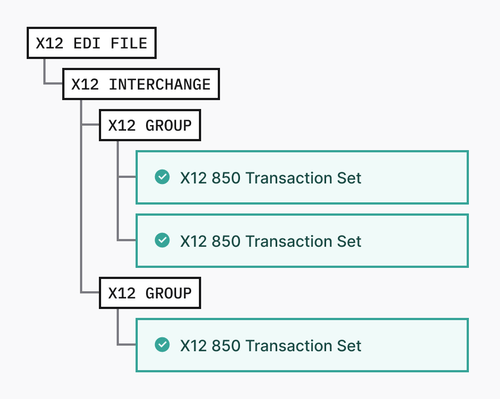
Consider an EDI file that contains two functional groups, and a total of three transaction sets. When Stedi successfully processes all transaction sets, it generates the following events:
* 1x `file.processed.v2` - indicating the entire file was processed successfully.
* 3x `transaction.processed.v2` - one event for each transaction set found in both groups.
### At least one transaction fails to validate
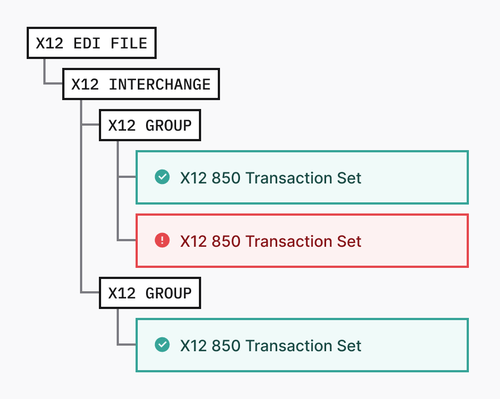
If one or more transaction sets in a file fails validation, Stedi emits a single `file.failed.v2` error, indicating that one or more transactions failed to process. Stedi cannot process the entire file until you address those issues.
## Event structure
All Stedi events follow a standard JSON Schema. The event payload itself does not include the contents of a given file or transaction. Instead, it references an API path to retrieve the entire object.
```json JSON event structure example
{
"version": "0",
"id": "8a9fc08a-24b2-4eeb-af7c-f96376ea471e",
"detail-type": "transaction.processed.v2",
"source": "stedi.core",
"account": "",
"time": "2021-11-12T00:00:00Z",
"region": "us-east-1",
"resources": [
"https://core.us.stedi.com/2023-08-01/transactions/3543b3f7-0d78-48cc-97c3-ac145e250a1d"
],
"detail": { ... }
}
```
In addition to their `version`, `id`, and `time`, events have the following properties:
* **`detail-type`** - Indicates the type of event, such as `transaction.processed.v2` or `file.failed.v2`.
* **`source`** - Indicates the component that generated the event. All events use `source: “stedi.core”`.
* **`account`** - The account ID that generated the event.
* **`region`** - The AWS region where the event was generated.
* **`resources`** - The URL to the resource that Stedi created. This could be a transaction or a file execution, depending on the event type. Hitting the URL with your API key is equivalent to calling the [Get Execution](/api-reference/edi-platform/core/get-executions) and [Get Transaction](/api-reference/edi-platform/core/get-transactions) endpoints.
* **`detail`** - The JSON payload. The schema for each payload is determined by the `detail-type`.